Sending Targeted Emails
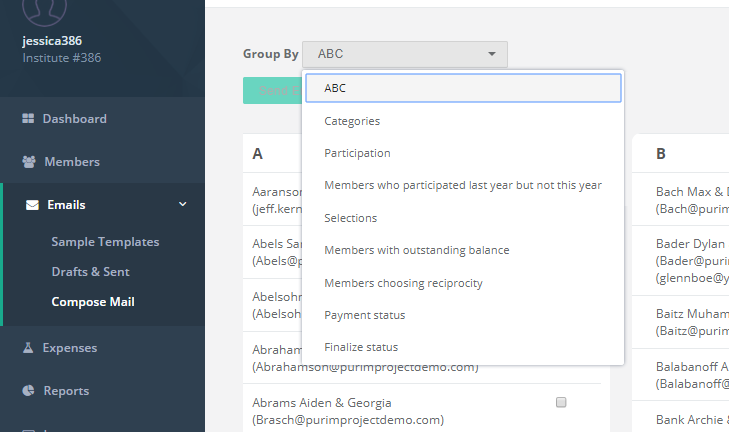
It's advised to avoid sending unnecessary emails to members and to make the ones you do send relevant and customized as much as possible. So while your initial invitation to participate in a Purim Project should go to everyone, your reminders should not. For reminder emails we suggest you have a few versions and target your audiences using the Comsend Group-by feature which can be found after you click the button to select recipients. Using this feature you'll be able to send reminders to members who have yet to participate and even customize an email to those who have been selected and have yet to select others (aka the Guilt Reminder). We suggest you try the different filters to see what groupings they produce.
Related Articles
Setting Up DNS for Sending Emails via Comsend - beta
Sending emails through your own domain (e.g., admin@yourshul.org) makes your communication look professional and trustworthy. It also improves email deliverability — reducing the chance that your campaign messages, receipts, or reminders get flagged ...Mid-Campaign Checklist
Following is a check-list you can review mid-campaign: Your invitation emails were sent Monitor your email invitation to confirm it was received by all, and handle exceptions. Review order activity You should see activity on the dashboard, both in ...Using Sample Templates for your Emails and Custom Texts
To save time and to get an idea of the wording you can use, you may choose to use a Sample Template for your emails and Custom Texts. For Emails You can find Sample Templates under the main menu under Emails. Simply click on the email Description and ...RELEASE NOTES
Release Notes: DATE FEATURE DESCRIPTION December 2025 New member website The member website was redesigned for easier and more streamlined use (available via Prefereneces) December 2025 Limiting greeting length To avoid long greetings that are ...Adding e-Greetings to your emails
As an alternative to the Final Letters you can email the greetings that members received via email. To do so in your email select the {greetings} macro.